
Friday, August 6, 2010
Come Take A Tour of the Biggest Apple Store in the World
You can find the biggest Apple Store in the world at Covent Garden in London. Now watch this video and take a quick virtual tour of Apple’s largest store in the heart of London, including a stretch Genius Bar and new Pro Labs education areas.
The store will open to the public this Saturday at 10 am.
[Electric Pig]

Early Release of an iPhone 5?
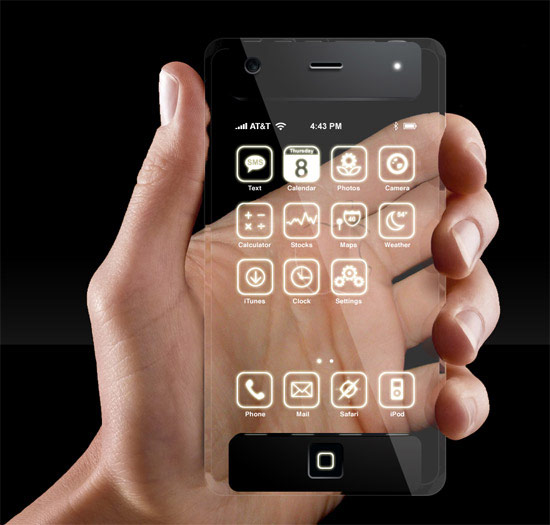 Yesterday TUAW reported on an iLounge leak, concerning several possibilities around new iPods, iPads, and yes, an early release of an iPhone 5 type device. Now, even iLounge themselves stated that they think such a device would be “highly unlikely”, however my blood started to boil just thinking of such a scenario. The rumor is that Apple would be releasing the device 6 months earlier than its previous summer cycle.
[How to] Fix Different SIM Detected Error After Jailbreak
Those users who used the phonebook SIM card trick to activate their iPhones have started getting a “ Different SIM Detected ” error message on emergency mode screen after jailbreaking their devices. Don’t worry because here is how to fix Different SIM Detected error shown on emergency mode.

Follow these Steps :
1. Download the ifunbox software from Here
2. Launch the software and sync your iPhone.
3. Now download the lockdown folder from here.the file will upload to other server
4. Navigate to /private/var/root/Library/ delete the original lockdown folder and put the earlier downloaded one in its place.
5. Restart your iPhone and the Different SIM Detected error will be fixed.

Follow these Steps :
1. Download the ifunbox software from Here
2. Launch the software and sync your iPhone.
3. Now download the lockdown folder from here.the file will upload to other server
4. Navigate to /private/var/root/Library/ delete the original lockdown folder and put the earlier downloaded one in its place.
5. Restart your iPhone and the Different SIM Detected error will be fixed.
iPod Touch 4G Leaked in eBay !!
Just a quick heads up, Just found an Apple's iPod Touch next generation, it seems like the iPod is not in market! You can join the eBay and bid for your offer. Also, there's some images for this iPod Touch 4G you can see it below..
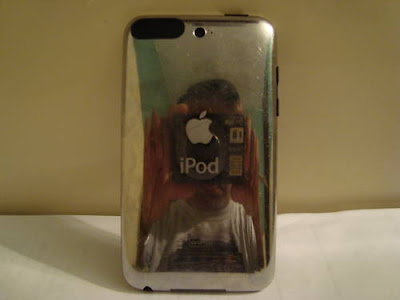 We have already seen an iPod Touch 4G in the wild, then we saw an iPod Touch 4G from MacRumors with a hole in the front referring to a FaceTime camera as in the iPhone 4, but this one not appearing if have a front camera or not!
 You can check this iPod Touch 4G in eBay and it's screenshots / images from here.
You can tell me what you think about this iPod Touch 4G and what's behind it in the comment section below..
 Update 1: In eBay, it's written "iPod Touch 3rd G" but it's the same photos of leaks before! so I wrote iPod Touch 4G! We still don't know if it's iPod Touch 4G or not, but it can't be 3G.


You can tell me what you think about this iPod Touch 4G and what's behind it in the comment section below..

Apple blocks site JailbreakMe.com from the Apple Store
These days, many users were having to go to the Apple Store to run the jailbreak of the iPhone 4 in exposure through the site Jailbreakme.com. As we might expect, Apple has blocked access to the site and so now you can not use the service.
Simply using OpenDNS, Apple has made sure that the visits to the Site www.jailbreakme.com be automatically redirected to the official site Apple.com. In this way, users can not use exploit to unlock the iPhone on display.

Recall also that Apple has already informed CNET that they have completed a patch that will fix the vulnerability in Safari and completely block the action of JailbreakMe.

All this will be included in the next firmware update, whose release is expected shortly.
Simply using OpenDNS, Apple has made sure that the visits to the Site www.jailbreakme.com be automatically redirected to the official site Apple.com. In this way, users can not use exploit to unlock the iPhone on display.

Recall also that Apple has already informed CNET that they have completed a patch that will fix the vulnerability in Safari and completely block the action of JailbreakMe.

All this will be included in the next firmware update, whose release is expected shortly.
Problems and Solutions with JailbreakMe 2.0 !!
JailbreakMe 2.0 Star was released a couple of days ago, A lot of problems found and leaked for some people but we probably solved most of them, this post shows you that most known problems when you try to jailbreak your iDevice using JailbreakMe from comex.

After logging into "Slide to Jailbreak" page, can't install?
Wi-Fi is not working?
Stuck on Purple Screen when trying to jailbreak your device?
After jailbreaking, update iTunes to 9.2.1 or not?
iPad 3.2.1 and not working?
If you didn't jailbreak your device yet then go ahead and don't worry, use this guide to jailbreak any iPhone on iOS 4 / 4.0.1, use this guide to jailbreak iPad on iOS 3.2.1, use this guide to unlock any iPhone on any baseband! After jailbreaking you have to install PDF Loading Warner to close the security hole that comex used to jailbreak your iPhone to avoid any attacks on your device.
Sure, if we missed any problems and solutions, hope you tell us by commenting below.

After logging into "Slide to Jailbreak" page, can't install?
- The solution for this problem is to power off and reboot your device several times till it work / Enable javascript in Safari may solve it too
Wi-Fi is not working?
- Inspect the wireless router, reboot Wi-Fi and iPhone 4G as well as undo the network settings.
- Note: If the selects in Wi-Fi is grey and show ”No Wi-Fi”, perhaps your BaseBand or Bootloader is broken, and the users use 2.0 above firmware need to reboot the ware
Stuck on Purple Screen when trying to jailbreak your device?
- Already told you how to solve this, the solution is about to clean your browser history by navigating to Settings --> Safari then go ahead and clear History, Cashe and Cookies, At the end reboot your device and open http://jailbreakme.modmyi.com
After jailbreaking, update iTunes to 9.2.1 or not?
- It's confirmed that you can safely upgrade to iTunes 9.2.1 and it will work as a charm!
iPad 3.2.1 and not working?
- Well, this issue was at first when it was released but now fixed, comex confirmed that it works on iPad 3.2.1 and people announced that it works!
If you didn't jailbreak your device yet then go ahead and don't worry, use this guide to jailbreak any iPhone on iOS 4 / 4.0.1, use this guide to jailbreak iPad on iOS 3.2.1, use this guide to unlock any iPhone on any baseband! After jailbreaking you have to install PDF Loading Warner to close the security hole that comex used to jailbreak your iPhone to avoid any attacks on your device.
Sure, if we missed any problems and solutions, hope you tell us by commenting below.
Wednesday, August 4, 2010
Ultrasn0w 1.0 Unlock all Baseband for iPhone 4/3GS/3G ( complete Guide )

Update : Ultrasn0w 1.0 has been updated !! Instructions below.
New Ultrasn0w 1.0 unlocks all iPhone versions !!
Thanks to sherif_hashim who found the exploit, the dev team has updated UltraSn0w. The updated UltraSn0w can be installed via Cydia in the Ultrasn0w repository. The new ultrasn0w works on all 3.0 and 4.0 baseband versions for 3g and 3gs and 4G devices. For those of you currently unlocked and having wifi issues, you can now remove blacksn0w and install ultrasn0w and be up and running in a more stable fashion.
If you are updating from blacksn0w, make sure you uninstall blacksn0w in cydia before installing ultrasn0w. If you installed blacksn0w via blackra1n, you probably need to restore.
These are instructions on how to unlock the iPhone 4G, 3G and iPhone 3GS for use with any GSM cellphone carrier using UltraSn0w. This will work with the iOS 4.x
Before you can follow these instructions you must have a jailbroken iPhone and you must be on the 04.26.08, 05.11.07, 05.12.01, 05.13.04 and 01.59.00 baseband(modem firmware).
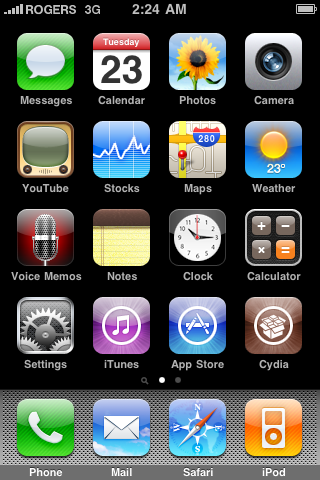
Step One
Press to launch Cydia Installer from your SpringBoard.
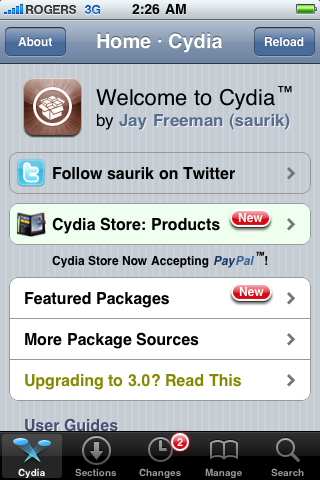
Step Two
Press to select the Manage tab at the bottom of the screen.
Step Three
Press to select the large Sources button
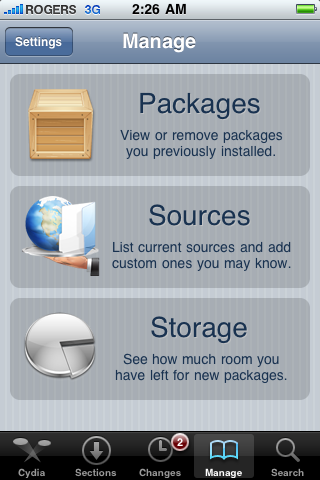
Step Four
If the ultrasn0w repo is not present press the Edit button at the top right of the screen. Otherwise, skip to Step Nine.
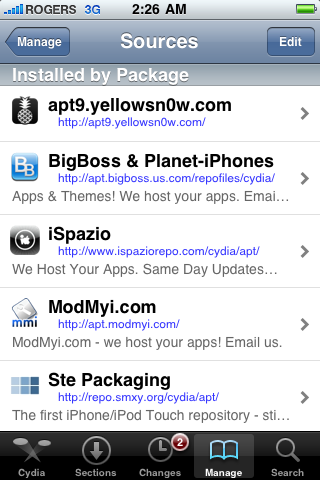
Step Five
Press the Add button at the top left of the screen.
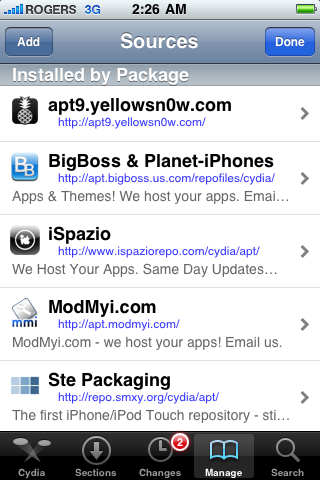
Step Six
Enter http://repo666.ultrasn0w.com/ as the source url and press the Add Source button.
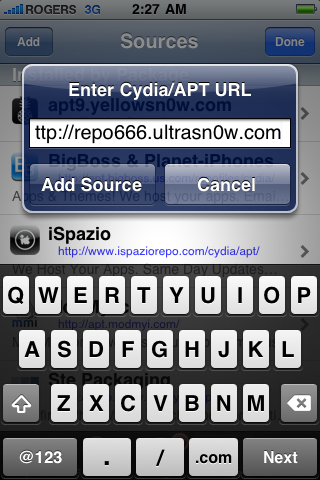
Step Seven
Once the source has been added press the large Return to Cydia button.
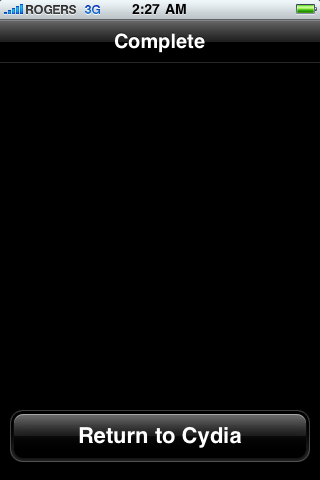
Step Eight
Press the Done button at the top right of the screen.
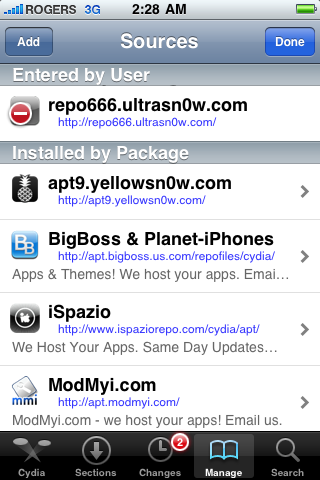
Step Nine
Press to select repo666.ultrasn0w.com from the list of user entered sources.
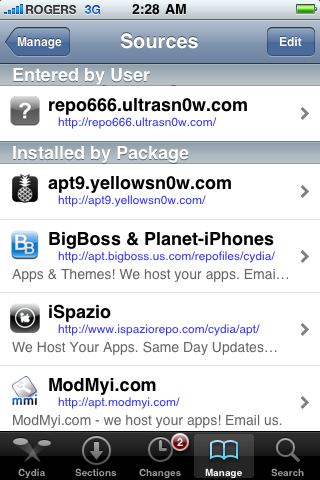
Step Ten
Press to select ultrasn0w from the list of packages
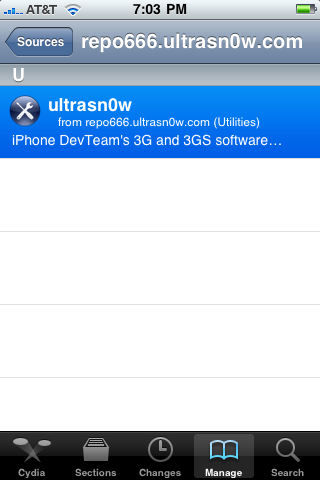
Step Eleven
Press the Install button at the top right of the screen.

Step Twelve
Press the Confirm button at the top right of the screen.
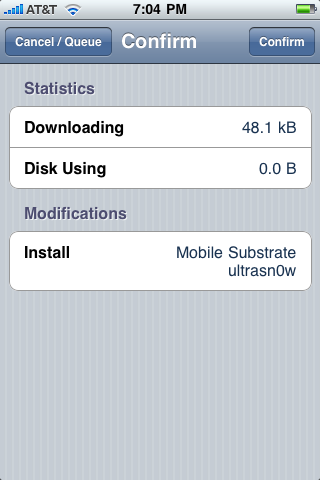
Step Thirteen
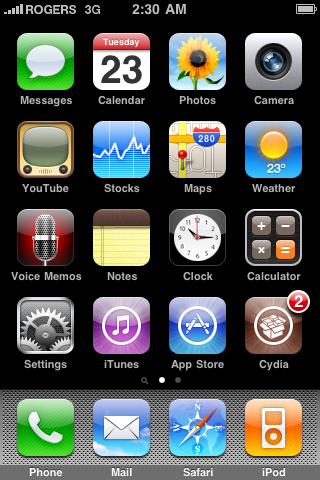
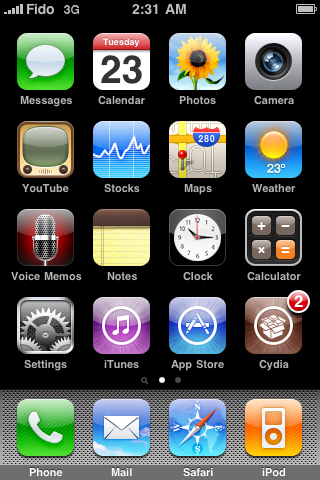
Now press the Home button then power off and power on the iPhone. You do this by holding down the power button for 3 seconds then moving the power slider that appears to the right. Press the power button again to turn on the phone.

Step Fourteen
You should now be able to insert the SIM of your choice!
Update 1: You can also Unlock the baseband [ without WiFi ] by following our post here
Update 2: When repo666.ultrasn0w.com is down , use the .org repo repo666.ultrasn0w.org instead.
Update 3: Ultrasn0w coming soon for iPhone 4 See our posted here
Update 4: Ultrasn0w 1.0.1 is Now support iPhone 4
Tuesday, August 3, 2010
JailbreakMe Puts Your iPhone At Risk. Here is How to Be Protected
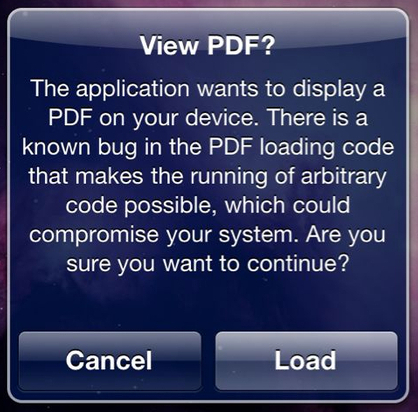
The way JailbreakMe works is that it takes advantage of a vulnerability in iOS, and more specifically the fact that iOS downloads PDF documents automatically. Comex managed to inject the jailbreak code in a PDF document that is downloaded and executed once you “slide to jailbreak” on JailbreakMe.com.
Now that this very simple exploit has been revealed, there are chances some bad guys out there might want to take advantage of it and potentially steal data from your iPhone. Before you start panicking and running around the house screaming, let’s be clear that the chances of this happening are actually very thin, but you never know…
MacStories published a fix for that earlier today:
Tweeted by @cdevwill earlier today, all you have to do is download this .deb file and open it on your device using either Terminal from your Mac, or iFile on the iPhone. Just download it and place it in /var/mobile.OR TRY THIS WAY
- Using Terminal:
ssh root@your IP address
alpine
dpkg -i file.deb
Where “alpine” is the default password you’ll get after installing Open SSH from Cydia and “your IP address” is located under Settings – > Wifi – > active wifi connection.
- Using iFile:
Navigate to /var/mobile and double tap on the .deb file to install it.
Instruction:
- Paste in Cydia the Source “http://repo.benm.at”
- Install the Package “PDF Exploit Warner”
- Make a Respring or Reboot


This won’t actually patch the exploit but it will now ask you for permission every time a PDF document wants to be downloaded to your iPhone. If you know what you’re downloading then fine. However if a site tries to use Comex’s exploit and downloads some malicious software onto your iPhone, you will be able to deny it access.
I believe this fix will be available in Cydia soon but if you can’t wait, and know your way around Terminal, then give this a shot. Apple will also issue a patch for this, most likely in the net iOS update.
Boy make FaceTime AppleSong on his Piano
This Morning i was listening to the new TheiH8sn0wCast and than i saw a Guy who play the Song on his Piano over FaceTime with iH8sn0w.
Check the Video below
Check the Video below
My3G Allows FaceTime on 3G
Here are the features as described in the app description:
- In-App popup request to enable/never ask for My3G to be enabled for that app
- In-App indicator when My3G changes the network from 3G to WiFi
- Ability to select which apps are My3G enabled and not.
- Default Apps – no configuration for the most popular apps!
- SBSettings Toggle! You can temporarily enable My3G for all apps or toggle back using your defined Apps list
- Dynamic enablement – Higher successs rate (near 100%) then 3G Unrestrictor (which does one off solutions for apps). My3G enables 3G indicators more dynamically.
My3G is available from both Cydia and Rock. The Rock version will cost you $3.99 while the Cydia version via ModMyI repo will cost you $2.79
How to Fix MMS and FaceTime Issue After Jailbreaking with JailbreakMe
Most of you who jailbroke their iPhone 4 using JailbreakMe lost their MMS and FaceTime capability. I just found out about a fix thanks to Krapps and Branden3112.
To fix your MMS and FaceTime issue, simply follow these steps:
If you use JailbreakMe now, you shouldn’t have any problem as it’s been updated to fix the issue. If you can’t wait for the official fix and if you don’t want to try this unofficial fix, you can always restore, and jailbreak again with the updated JailbreakMe.
To fix your MMS and FaceTime issue, simply follow these steps:
- Go to Cydia and add this source: http://iphonedelivery.advinux.com/cydia/
- Once this source has been added, install “iPhoneDelivery” from it.
- Reboot your iPhone
- Go to Settings > Phone > Turn FaceTime ON
- Done!
If you use JailbreakMe now, you shouldn’t have any problem as it’s been updated to fix the issue. If you can’t wait for the official fix and if you don’t want to try this unofficial fix, you can always restore, and jailbreak again with the updated JailbreakMe.
Monday, August 2, 2010
Guide:New i-Device Jailbreakme 2.0
1. What is JailbreakMe 2.0?
This is the latest cross-device/firmware jailbreak by comex. It was released on Sunday, August 1 (like the previous jailbreak, carrying over the “Sunday is Funday” slogan many veteran jailbreakers and unlockers are familiar with.
2. How Does this Jailbreak Work?
All you have to do is visit http://jailbreakme.com on your iPhone, iPod touch or iPad, ‘Slide to Jailbreak’ and wait for the rest of the process to take place on your device.
If that link is not loading, please use ModMyi’s alternative link to jailbreak your device.
3. My Device Just Hangs at a Purple Screen. What do I do?
This will usually mean there was a problem connection to the server and whatever you’re attempting to do isn’t working properly. After sliding, a windows should appear and you should notice a process similar to the one in the images below. If your jailbreak does not appear similar to mine, then something had gone wrong. Reboot and attempt the jailbreak again.
Please note that this process may take a few minutes, so be patient. It should look a little something like this:


4. Something Went Wrong! What do I do?
Please post any bugs below in the comments section or email comex at: comexk@gmail.com with a detailed log or error report and provide him with visuals if possible.
5. Where’s the iPhone 4 Unlock?
Simply install unltrasn0w through Cydia like you did on older iPhone models and your iPhone 3G S and/or iPhone 4 should be unlocked.
6. My Device Needs to be Activated, so what do I do?
You’ll need to purchase an official SIM card for the carrier your iPhone is locked to or purchase a phonebook SIM online and activate it that way. A quick search on Google/eBay should turn up a few different phonebook SIM cards that work on any iPhone.
This jailbreak IS NOT a hacktivation tool, so you must activate it through iTunes first.
This is the latest cross-device/firmware jailbreak by comex. It was released on Sunday, August 1 (like the previous jailbreak, carrying over the “Sunday is Funday” slogan many veteran jailbreakers and unlockers are familiar with.
2. How Does this Jailbreak Work?
All you have to do is visit http://jailbreakme.com on your iPhone, iPod touch or iPad, ‘Slide to Jailbreak’ and wait for the rest of the process to take place on your device.
If that link is not loading, please use ModMyi’s alternative link to jailbreak your device.
3. My Device Just Hangs at a Purple Screen. What do I do?
This will usually mean there was a problem connection to the server and whatever you’re attempting to do isn’t working properly. After sliding, a windows should appear and you should notice a process similar to the one in the images below. If your jailbreak does not appear similar to mine, then something had gone wrong. Reboot and attempt the jailbreak again.
Please note that this process may take a few minutes, so be patient. It should look a little something like this:


4. Something Went Wrong! What do I do?
Please post any bugs below in the comments section or email comex at: comexk@gmail.com with a detailed log or error report and provide him with visuals if possible.
5. Where’s the iPhone 4 Unlock?
Simply install unltrasn0w through Cydia like you did on older iPhone models and your iPhone 3G S and/or iPhone 4 should be unlocked.
6. My Device Needs to be Activated, so what do I do?
You’ll need to purchase an official SIM card for the carrier your iPhone is locked to or purchase a phonebook SIM online and activate it that way. A quick search on Google/eBay should turn up a few different phonebook SIM cards that work on any iPhone.
This jailbreak IS NOT a hacktivation tool, so you must activate it through iTunes first.
Sunday, August 1, 2010
[UPDATE] The New Jailbreak is Out [added all URL´s]
JailbreakMe works on the device itself! Visit this website on your iPhone, iPod touch, or iPad to get started.

@comex If you get hard reboots and stuff, email me: comexk@gmail.com
http://jailbreakme.com/
http://jailbreakme.modmyi.com/
http://jailbreakme.ca/
http://tinyurl.com/JA1LBR3AK3R -> this step is for the OpenAppMarket for instruction follow this Guide

@comex If you get hard reboots and stuff, email me: comexk@gmail.com
http://jailbreakme.com/
http://jailbreakme.modmyi.com/
http://jailbreakme.ca/
http://tinyurl.com/JA1LBR3AK3R -> this step is for the OpenAppMarket for instruction follow this Guide
Unlocked iPhone 4 Prices arround the world !!
Looking for the new iPhone? Want to know all the prices in different countries of the world where you can purchase Unlocked SIM and then working with the your country? Here is a beautiful chart made by a reader iFun.de that is just for you
Each flag represents a country and the one with the best prices and Hong Kong where the iPhone 16GB will cost you € 496 and the 32GB is € 585
You can click to enlarge or download in PDF format by Download from here.
 |
| [Click Picture for Enlarge] |
Each flag represents a country and the one with the best prices and Hong Kong where the iPhone 16GB will cost you € 496 and the 32GB is € 585
You can click to enlarge or download in PDF format by Download from here.
Geeky iPhone Apps Coasters Will Be the Life of the Party

Because they’re made using the original high resolution artwork, these coasters come out looking great, crisp with a glossy finish. And to those of you wondering, no, they will not turn your coffee table into an iPad, but we sure hope they did.
These iPhone app coasters come in 3 sets of 6 icons. Each set is about $32. You can get them from here.
If you call yourself an iPhone lover then you owe it to yourself to get the geekiest of all iPhone accessories: the iPhone apps coasters.

Apple Removes Rival Smartphone Antenna Videos From Its Website
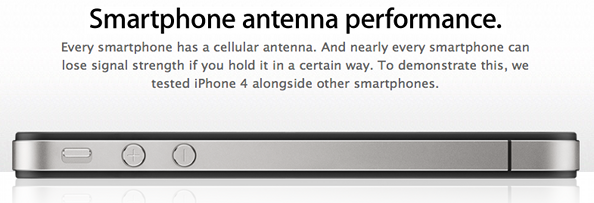 TechCrunch reports that Apple removed every video showing rival smartphones losing antenna signal from its US website.
As you can see on this pageWhat’s interesting is that the videos were not removed from the Canadian website or from Apple’s YouTube channel, even though they are now a little header to find there., the videos are nowhere to be found. Instead, the page now only shows the overview of the antenna design and test labs. A search of Apple’s website brings up a few of the landing pages where the videos used to be — here’s the Droid X one
So why were these videos removed from Apple’s website? Your guess is as good as mine but one can easily imagine Apple may have received legal threats from RIM, HTC, Samsung, Motorola, and Nokia who weren’t probably very happy to see their handsets associated with Apple’s negative press.
Last month, RIM, Nokia, and HTC responded to Apple’s claim that every smartphone suffers from antenna attenuation by pretty much saying Apple is trying to bring every smartphone maker down with them. I can see why they’d be pissed at Apple.
What’s your take on it? Why do you think the videos are down in the US but not in other parts of the world? What’s going on here?
MuscleNerd: The Problems Have Been solved with FaceTime (Count Down Started)
We all heard about the problem which the dev team faced with the FaceTime, which was reason of delaying the release of Jailbreak. But a few minutes ago MuscleNerd sent a tweet saying that all problems have been solved with FaceTime.


Lol someone must been inspired by iH8sn0w name
This what i get jsut now on Twitter
 onBROADWAYst
@iH8sn0w, yo check this out! Lol someone must been inspired by your twitter name

thx @onBROADWAYst
onBROADWAYst @iH8sn0w, yo check this out! Lol someone must been inspired by your twitter name
thx @onBROADWAYst
Get ready to jailbreak!

Note: Prepare a jailbreak does not mean immediate availability of the jailbreak!
BigBoss has updated its repo, two iPhone 4 apps and we just tell you the release time may be on Sunday if everything was stable by Comex.
the jailbreak tool for iPhone 4 is ready unlocked by the Dev Team and PlanetBeing with two method you can see it from our posted Here and the other Here with video , it just lacked that stabilizes and optimizes Saurik Cydia after jailbreak on the iPhone 4.
Here are some guides to read to prepare you for this release.
Note: the message Twitter is not 100% but it turns on the canvas ... this may be a private message to Saurik or just a fake!

The new jailbreak tool for iPhone 4 will be compatible with all models in all iDevice firmware, an update Ultrasn0w Unlocker for all models of iPhone, will also be provided after the next release!
Update on Comex’s iPhone 4 and iOS 4 / 4.0.1 Jailbreak Release
Here is a quick update on the upcoming Comex’s jailbreak for iPhone 4 and iOS 4 / 4.0.1. It was only yesterday when we informed you all that Comex in an interview said that he is “almost” done with the jailbreak and now he is waiting for Saurik (the creator of Cydia) to complete the last bits which are required for the jailbreak.
Stay tuned, as we will provide you the download links, along with full how-to guides as soon as the new jailbreak is available. [Thanks, Anonymous Sender]
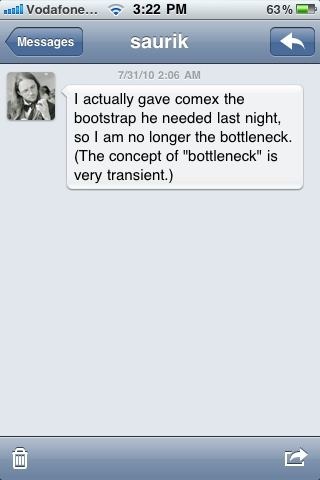
You will have to ask Saurik if he’s done with that bootstrap yet. Like I hate to say this because people will be complaining, but it is pretty close to done.Today, in an image sent to us by one of our reader who wishes to remain anonymous, Saurik seems to be done with the “bootstrap” thing which Comex wanted from him for the jailbreak. This is what he wrote in a Direct Message to a user on Twitter:
I actually gave comex the bootstrap he needed last night. so I am no longer the bottleneck. (The concept of “bottleneck” is very transient.)So there you go.. If I read that right, we are probably now closer to the release than ever before. It seems like the new jailbreak tool is now going through final release mechanics before it is released to public.
Stay tuned, as we will provide you the download links, along with full how-to guides as soon as the new jailbreak is available. [Thanks, Anonymous Sender]

Subscribe to:
Posts
(
Atom
)